MODULAR MARKET INTELLIGENCE
Institutional-Grade Market Intelligence. One Access Point.
50+ specialized Scanners and Quant Models, professional charts, live market intelligence and AI-assisted analysis — integrated into one analytical environment.
- 50+
- ANALYTICAL MODULES
- REALTIME
- ARCHITECTURE
- ONE
- DATA CONTEXT
- ONE
- ACCESS POINT
WHY SMD
From fragmented signals to a unified market view.
No single indicator, Scanner or model can describe every market condition. SMD brings specialized analytical perspectives into one environment, allowing users to examine market structure, momentum, volatility, liquidity, macro conditions, statistical relationships and other market dimensions within a shared analytical context.
Different models.
Different perspectives.
One analytical context.
SMD ARCHITECTURE
From market data to SMD view.
Specialized analytical systems examine different dimensions of the market. SMD brings their outputs into a shared analytical environment, allowing users to move from broad market monitoring to deeper analysis without switching between disconnected platforms.
- 01
MARKET DATA
- 02
SCANNERS + QUANT MODELS
- 03
SMD ANALYTICAL LAYER
- 04
CENTRAL WATCHLIST / SMD VIEW
- 05
CHART · LIVE NEWS · SMD ASSISTANT · ALERTS
SMD analytical architecture
PLATFORM
One platform. Multiple intelligence layers.
The SMD Personal Cabinet connects analysis, monitoring and market intelligence within one consistent analytical context.
ANALYZE
01- SCANNERS
- QUANT MODELS
- CHART
MONITOR
02- DASHBOARD
- WATCHLIST
- ALERTS
UNDERSTAND
03- LIVE NEWS
- SMD ASSISTANT
Eight connected areas. One analytical environment.
SMD PERSONAL CABINET
The platform, through one workspace.
The Personal Cabinet brings SMD's analytical workspaces, market monitoring, Live News and SMD Assistant together within one professional operating environment.
 STREAM MARKET DATAPERSONAL CABINET
 STREAM MARKET DATA
SCANNERS
Specialized engines for distinct market conditions.
SMD Scanners examine different dimensions of market behavior — including structure, momentum, extremes, breakouts, macro context, patterns and cross-market relationships — within one analytical environment.
Main Scanner
Multi-factor market signal analysis.
Extreme Scanner
Extreme market-condition detection.
Impulse Scanner
Momentum and impulse analysis.
Macro Scanner
Cross-market macro-context analysis.
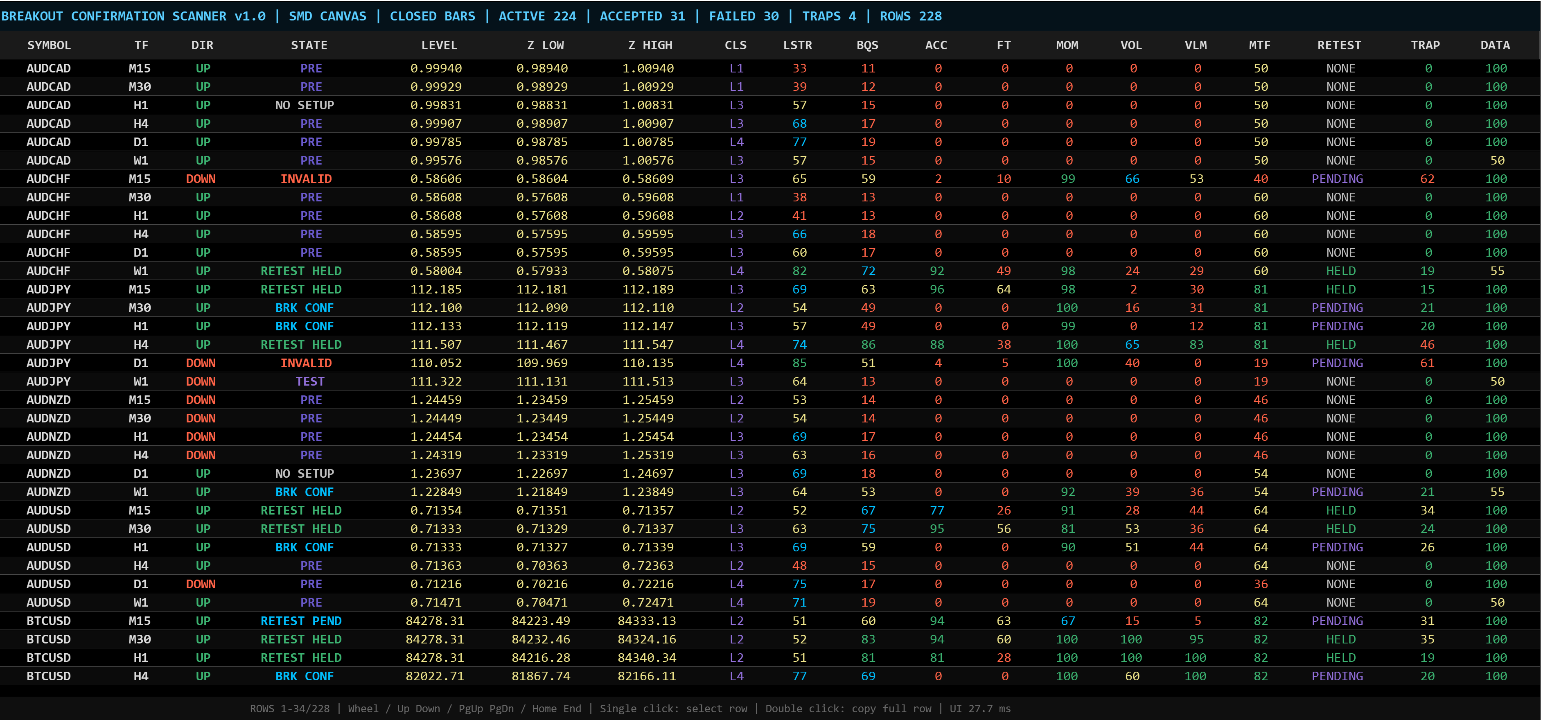
Breakout Confirmation Scanner
Breakout acceptance, retest and continuation analysis.
AI Pattern Recognition Scanner
Historical market-pattern recognition and comparison.
Elliott Wave Scanner
Elliott-wave structure and count analysis.
Correlation Intelligence Scanner
Cross-market relationship and correlation analysis.
Representative systems from the broader SMD Scanner architecture.
QUANT MODELS
Model-driven analysis beyond scanner output.
SMD Quant Models extend market analysis through statistical relationships, historical analogs, anomaly detection, probability assessment, regime analysis, forecast structures, fair-value estimation and divergence analysis.
MPAR
Momentum and price anomaly analysis with historical analog comparison.
Rates–FX Fair Value & Divergence
Yield-spread relationships, fair-value estimation and FX divergence analysis.
Representative SMD Quant Models.
CENTRAL WATCHLIST
Your market. One consolidated SMD view.
The Central Watchlist serves as the primary daily market-monitoring screen, bringing the current SMD view and its historical context together before deeper module-level analysis is needed.
Illustrative field layout · No live market data shown
A CONSOLIDATED VIEW FIRST.DEEPER ANALYSIS WHEN NEEDED.
DAILY WORKFLOW
Start broad. Investigate only where needed.
- 01
WATCHLIST
Identify markets that require attention from one consolidated view.
- 02
ANALYZE
Open a Scanner, Quant Model or Chart when deeper analysis is needed.
- 03
LIVE NEWS
Monitor relevant events and changing market context.
- 04
SMD ASSISTANT
Request explanations, retrieve analytical context and navigate the platform.
ONE WORKFLOW. MULTIPLE ANALYTICAL LAYERS.
CHART
One market. One analytical context.
Chart keeps visual market analysis connected to the same instrument, timeframe and analytical context used across SMD.
PROFESSIONAL WORKSPACE
Built for professional workspaces.
SMD supports multi-window and multi-monitor workflows, allowing analytical modules to operate in independent windows while related views maintain synchronized market context. Workspace state can be preserved across professional desktop configurations.
USE ONE SCREEN OR MANY.SMD IS DESIGNED TO SCALE WITH YOUR WORKSPACE.
Illustrative multi-monitor workspace layout
LIVE NEWS
From news flow to market context.
SMD Live News transforms continuous market-news flow into structured market intelligence by collecting relevant information, classifying and prioritizing events, identifying affected markets and producing concise summaries of the developments that matter.
COLLECT
CLASSIFY
PRIORITIZE
SUMMARIZE
CONNECT TO RELEVANT MARKETS
Public Live Market News is a separate publication page.
SMD ASSISTANT
The natural-language interface to SMD.
SMD Assistant provides a natural-language interface to the SMD analytical environment, helping users retrieve market and platform information, understand analytical outputs, navigate modules and work with analytical context without manually searching through every part of the system.
Representative SMD Assistant interactions
- 01ASK ABOUT AN INSTRUMENT
- 02EXPLAIN SCANNER VALUES
- 03INTERPRET QUANT MODEL OUTPUTS
- 04COMPARE ANALYTICAL CONTEXT
- 05FIND SMD FUNCTIONS
- 06OPEN / NAVIGATE TO A MODULE
- 07UNDERSTAND THE WORKSPACE
- 08ASSIST WITH WORKSPACE CONFIGURATION
CONTEXTUAL MODULE GUIDES
Each Scanner and Quant Model includes contextual guidance for its own fields, values and analytical states, allowing users to understand module-specific information without leaving the analytical workspace.
ALERTS
Monitor what matters.
Alerts provide a centralized monitoring layer for configured market and analytical conditions within the same SMD environment.
HISTORICAL VALIDATION
Analysis should be measurable.
SMD preserves analytical signals, forecasts and observed outcomes so users can evaluate how analytical logic behaved over time.
Historical validation turns analytical output into an auditable record rather than an untracked prediction.
- 01SIGNAL / FORECAST
- 02OBSERVATION PERIOD
- 03OUTCOME
- 04HISTORICAL RECORD
TRUST & METHODOLOGY
Built on transparent mathematics. Validated through data.
SMD combines established quantitative methods with proprietary analytical logic.
Models are evaluated for mathematical consistency, historical behavior and stability across different market conditions.
REALTIME INFRASTRUCTURE
Built for realtime market intelligence.
SMD maintains current market information, visible data freshness and system status while preserving consistent analytical context across connected modules.
REALTIME DELIVERY
Market information is distributed across connected analytical workspaces.
DATA FRESHNESS
Users can distinguish current information from stale or degraded data.
SYSTEM HEALTH
Service state remains visible when data or analytical services are degraded or unavailable.
CONSISTENT CONTEXT
Related views operate within a shared instrument and market context.
ACCESS
SMD Access
SMD access is currently limited to authorized users.
Existing authorized users can enter the Personal Cabinet through ENTER SMD. New user access will become available when public authorization is enabled.
ACCESS NOTIFICATION
Leave your email to be notified when new user access becomes available.
FAQ
Platform questions.
What is SMD?
SMD is a modular market-intelligence platform that combines specialized Scanners, Quant Models, professional charts, Live News, historical validation and AI-assisted analysis within one analytical environment.
How is SMD different from a traditional trading terminal?
Traditional trading terminals primarily focus on market access, charting and execution. SMD focuses on market intelligence: combining specialized analytical perspectives, historical context, market monitoring and AI-assisted analysis within one environment.
Why does SMD use multiple Scanners and Quant Models?
Different analytical systems examine different dimensions and market conditions. SMD brings those perspectives together so users are not dependent on a single indicator, model or analytical methodology.
What is the Central Watchlist?
The Central Watchlist is the primary market-monitoring screen, consolidating the current SMD view, confidence, confirmed historical accuracy, previous confirmed forecast information and current deviation for selected instruments.
What is SMD Assistant?
SMD Assistant is the natural-language interface to the SMD analytical environment. It helps users retrieve information, understand Scanner and Quant Model outputs, compare analytical context, navigate modules and work with the platform more efficiently.
What is Live News?
SMD Live News converts continuous market-news flow into structured market intelligence by collecting, classifying, prioritizing and summarizing relevant developments and connecting them with affected markets. Public Live Market News remains a separate publication page.
Does SMD execute trades?
No. SMD is an analytical environment; it does not execute trades or guarantee market outcomes.
How does SMD validate analytical outputs?
SMD records analytical signals and forecasts together with their observation periods and subsequent outcomes, creating a historical record that can be used to evaluate analytical behavior over time.
Can SMD be used across multiple monitors?
Yes. SMD supports multi-window and multi-monitor workflows, allowing analytical modules to be organized across a professional desktop workspace while related views maintain shared market context.
Is SMD publicly available?
SMD access is currently limited to authorized users. New user access will open when public authorization is enabled.
ONE ACCESS POINT
One platform. One analytical environment. One access point.
Access SMD's integrated market-intelligence environment through the Personal Cabinet.